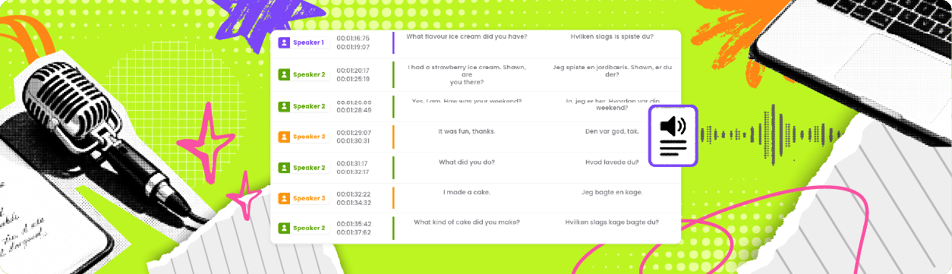
A bad transcript creates more work than it saves. Missed names, mangled jargon, no speaker labels, no timestamps - now someone has to fix it by hand. If you want to know how to do audio transcription well, the goal is simple: get to a clean, usable transcript fast, without sacrificing accuracy or privacy.
That means treating transcription as a workflow, not a one-click task. The audio matters. The tool matters. The output format matters. And if the recording is sensitive, your data policy matters just as much as your error rate.
What audio transcription actually involves
Audio transcription is the process of converting spoken content into written text. That sounds straightforward until you hit real-world files: overlapping speakers, background noise, accents, legal terminology, technical vocabulary, and recordings made on phones in echo-filled rooms.
So the real question is not just how to do audio transcription. It is how to do it in a way that fits the job. A podcast transcript needs readability. A legal interview needs precision. A research recording may need speaker separation and timestamps. A marketing team may need subtitles and translation next, not just raw text.
Start by deciding what the transcript is for. That one decision shapes every step after it.
Choose the right transcription method
You have two options: manual transcription or automated transcription.
Manual transcription gives you maximum control, but it is slow and expensive. One hour of audio can easily take four or more hours to transcribe properly, especially if the sound quality is rough. For high-stakes material, manual review still has a place. But doing everything by hand is rarely the best use of time.
Automated transcription is the practical default for most teams. It is faster, more affordable, and good enough for a wide range of professional use cases, especially when you review the output before publishing or filing it away. The trade-off is obvious: speed goes up, but accuracy depends heavily on audio quality, speaker clarity, and the platform you use.
For most creators, media teams, and business users, the best workflow is automated first, then human review. You cut the heavy labor without giving up quality control.
Prepare your file before you transcribe
Good input produces better output. This is where many transcription jobs go sideways.
If you are recording new audio, use the best source you can get. Put speakers close to the microphone. Reduce background noise. Ask people not to talk over each other. If names, acronyms, or industry terms are likely to come up, keep a reference list nearby for the editing stage.
If the file is already recorded, listen to the first minute before uploading it anywhere. Check whether the sound is clear enough, whether multiple speakers are distinguishable, and whether there are sections that may need manual correction later. This quick review tells you what kind of cleanup to expect.
File naming also matters more than people think. A file called final-interview.wav is not helpful three weeks later. Use names that identify the project, date, speaker, or episode so the transcript stays traceable.
How to do audio transcription with an efficient workflow
The fastest clean process usually looks like this: upload the file, generate the draft transcript, review for accuracy, format the text for its intended use, and export it in the right file type.
That sounds basic, but each step has a purpose.
Step 1: Upload the cleanest version of the audio
Use the highest-quality source file available. Avoid re-recorded audio if you have the original. Compression, screen captures, and forwarded voice notes often degrade clarity and make speech recognition less accurate.
If your platform supports both audio and video, upload whichever version has the best sound. Transcription engines care more about audio quality than file type.
Step 2: Generate the first draft automatically
This is where speed pays off. A modern transcription platform can convert long recordings into editable text in minutes instead of hours. If speaker identification is available, turn it on. If your workflow will continue into subtitles or translation, choose a tool that supports those outputs in the same environment so you do not have to rebuild the file later.
This is also where privacy standards should be checked, not assumed. If you handle interviews, legal calls, internal meetings, medical discussions, or unreleased media, make sure the provider does not use your content for AI training. Convenience is not worth a data governance problem.
Step 3: Review for the errors that matter
Not every transcript needs perfection. But every transcript needs the right kind of accuracy.
For a blog post or content repurposing project, you may only need to fix names, quotes, and obvious wording errors. For compliance, legal, or research work, you may need a closer review with timestamps and exact phrasing preserved.
The smart move is to edit by priority. Start with speaker names, key facts, proper nouns, numbers, dates, and action items. Those errors create the most downstream damage. Then clean up filler words, punctuation, and formatting based on how polished the final transcript needs to be.
Step 4: Format for the actual use case
A transcript is not one thing. The final format depends on where it is going.
If the transcript is for internal reference, plain paragraphs may be enough. If it is for publication, break it into readable sections and remove verbal clutter. If it is for subtitles, line length and timing matter. If it is for legal or research use, include timestamps and consistent speaker labels.
This is why one export option is never enough. You want flexibility: TXT for simple text, DOCX for editing, SRT or VTT for subtitles, and formats that work with the rest of your workflow.
Accuracy depends on more than the tool
People often blame the software when the bigger issue is the source audio. Strong transcription results usually come from a mix of three things: clear recording, a capable engine, and a short human review.
Accents, crosstalk, jargon, and low-volume speakers all affect results. So does context. A transcript from a board meeting, a YouTube interview, and a courtroom recording should not be approached the same way.
That is why flat promises about 100 percent accuracy are not useful. The better question is whether the workflow gets you to a reliable final transcript quickly, at a predictable cost, and without exposing your data.
When you should use timestamps and speaker labels
Timestamps are not always necessary, but when they are, they are essential.
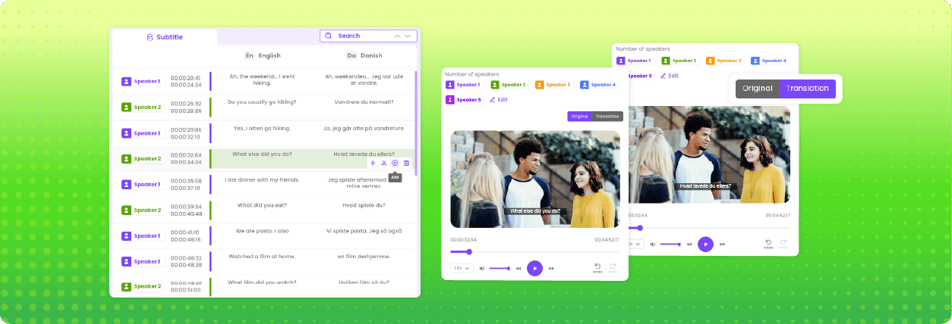
Use timestamps when someone will need to locate exact moments in the recording later. That includes interviews, legal review, editorial clipping, research analysis, and team collaboration. They reduce friction because nobody has to scrub through an hour-long file to find one quote.
Speaker labels matter whenever more than one person is talking and the transcript will be shared, quoted, or analyzed. Even if the transcript is only for internal use, unlabeled dialogue gets confusing fast.
Privacy is part of the transcription process
If your audio contains sensitive information, privacy is not a bonus feature. It is a core requirement.
Before you transcribe anything confidential, check how the platform handles uploaded files, whether your content is used for model training, and whether the pricing model forces unnecessary account sprawl with seat-based access. Many teams do not think about these issues until procurement, legal, or a client asks the hard questions.
A simpler, privacy-first platform is usually the better operational choice. Less friction. Fewer surprises. More confidence that your recordings stay yours. Full stop.
What to look for in a transcription platform
The best platform is not the one with the longest feature page. It is the one that removes work.
Look for fast turnaround, accurate automated transcripts, speaker identification, subtitle generation, translation support, clean exports, and pricing that makes sense without negotiation or seat math. If you transcribe regularly, predictable usage-based pricing is easier to manage than bloated plans with features you do not need.
For teams handling multilingual content, transcription should not stop at text conversion. If you also need subtitles and translation, keeping those steps in one system saves time and avoids version control headaches. That is where tools built for practical media workflows stand out. Dub-Dub, for example, is designed around that logic: simple processing, privacy-first handling, and flat pricing that stays easy to understand.
Common mistakes that slow everything down
The biggest mistake is expecting raw output to be final output. Even strong automated transcription usually needs a quick pass.
The second mistake is choosing a tool based only on headline accuracy. If the interface is clumsy, exports are limited, or privacy terms are vague, your team pays for it elsewhere.
The third is ignoring the end use. A transcript for subtitles, searchability, compliance, and content repurposing should not all be treated the same way.
If you get those three things right - source quality, review workflow, and platform choice - transcription becomes a production advantage instead of a cleanup chore.
The best transcription process is the one that gets out of your way. Make the audio clear, use automation for the heavy lift, review what matters, and keep control of your data from start to finish.