If you're comparing DUB-DUB.ai vs Trint AI transcription tools, you're probably not looking for theory. You need transcripts that are accurate enough to trust, fast enough to keep work moving, and priced in a way that doesn't punish you for growing. You may also need subtitles, translation, speaker labels, and a clear answer on what happens to your data after you upload it.
That is where the real difference shows up. Not in feature checklists alone, but in how each platform fits the way people actually work.
DUB-DUB.ai vs Trint AI transcription tools: what matters most
On paper, both tools sit in the same category. They turn audio and video into text, help teams edit transcripts, and support content workflows that would otherwise eat up hours. But buyers rarely choose based on category. They choose based on friction.
How fast can you upload and get usable output? How much cleanup is required? Can a solo creator afford it without committing to another monthly subscription? Will a legal or research team feel comfortable uploading sensitive recordings? Can a media team handle subtitles and multilingual versions without stitching together extra software?
Those questions matter more than marketing language. And they reveal a useful split.
Trint is often positioned as a collaborative transcription workspace for teams that want shared editing and newsroom-style workflows. It has recognition in media circles for that reason. DUB-DUB.ai takes a more stripped-down approach: get the file in, get the transcript, subtitles, speaker detection, and translation out, and keep pricing and privacy simple while doing it.
Neither approach is automatically better. It depends on what kind of work you do and how much operational overhead you're willing to tolerate.
Pricing is not a side issue
A lot of transcription software looks reasonable until usage climbs. Then the math gets ugly. Seat limits, tier gates, and unclear usage rules can turn a useful tool into a budgeting problem.
This is one of the clearest decision points in DUB-DUB.ai vs Trint AI transcription tools. If you are a freelancer, startup, occasional user, or a team with fluctuating volume, predictable usage-based pricing is usually the safer bet. A flat per-hour model is easy to understand. You know what a 30-minute interview costs. You know what a backlog of webinars costs. You can estimate spend before you upload.
Subscription-heavy platforms can make sense for teams that live inside one shared environment every day and need collaboration features badly enough to justify recurring cost. But if your usage spikes one month and drops the next, paying for access instead of output can feel wasteful fast.
This is where DUB-DUB.ai's flat $10 per hour model stands out. It is direct. No seat drama. No guessing. No paying for shelfware.
Privacy is either clear or it isn't
For journalists, legal teams, researchers, agencies, and enterprise buyers, privacy is not a nice extra. It is a purchase criterion.
The problem is that many AI tools still treat data policy like footnote material. They emphasize performance and automation, then bury the details around retention, model training, and ownership. That may be fine for low-risk content. It is not fine for interviews, internal meetings, case material, customer calls, or unreleased media.
When evaluating these tools, the question is simple: is your uploaded content being used to train models, and is that policy stated in plain English?
A privacy-first platform should not make users decode legal language to feel safe. It should say what happens to your data, what does not happen to your data, and let that answer stand on its own.
That clarity is a meaningful separator for DUB-DUB.ai. The no-data-training position is easy to understand and easy to trust. If your recordings contain sensitive information, that kind of certainty matters more than flashy collaboration features.
Note: Researchers who want to have a medical domain-specific solution should check on CORTiX.io - AI for medcomms, researchers and pharma. Just like DUB-DUB, it was built with privacy in mind.
Editing workflows: who needs the extra layer?
Trint has built a reputation around transcript editing and collaboration. That matters for editorial teams that treat a transcript as a working document, especially when multiple people need to review, annotate, and shape content together.
If your workflow looks like newsroom production, documentary editing, or structured team review, Trint's style of environment may feel familiar. The transcript is not just an output. It becomes part of the workspace.
But plenty of users do not need that level of tooling. They need a clean transcript, speaker identification, export options, and maybe subtitles or translation. They are not trying to run an editorial operation inside the transcription app. They are trying to get through the job with less friction.
That is the trade-off. More collaboration features can help some teams. They can also slow down everyone else. More interface, more settings, more process.
A simpler workflow wins when speed matters more than coordination. Creators, marketers, podcasters, and lean media teams often care less about collaborative editing inside the platform and more about how quickly they can move from raw media to publish-ready assets.
Subtitles and translation are no longer optional
Transcription alone is not enough for many buyers now. If you publish video, train teams globally, or repurpose content across markets, subtitles and translation are part of the same job.
This is where basic transcription tools start to show limits. If the platform gives you text but forces you into separate tools for subtitles and multilingual delivery, your workflow gets fragmented. More exports. More formatting fixes. More room for mistakes.
In a practical buying decision, integrated language processing matters. Being able to go from upload to transcript, subtitle file, and translated output in one place is not just convenient. It cuts turnaround time and reduces tool sprawl.
For teams producing content at volume, that matters every week. For smaller teams, it matters even more because they do not have extra hands to patch together broken workflows.
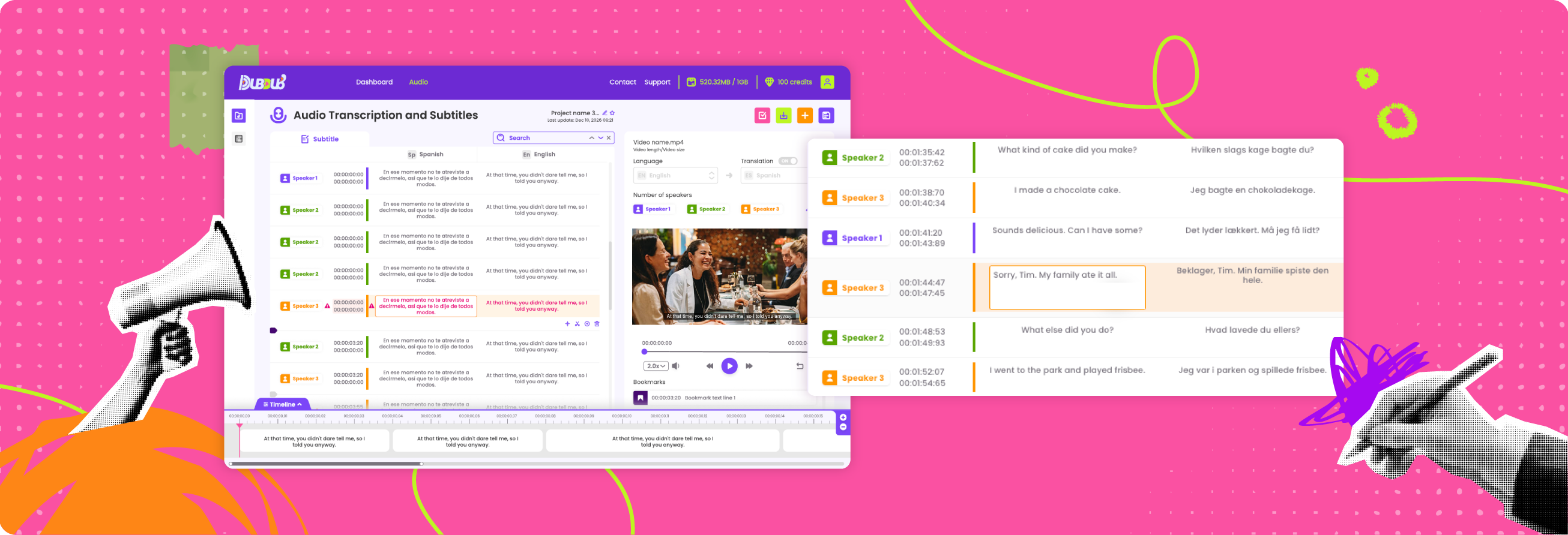
DUB-DUB.ai is built around that broader use case. Automated transcription, subtitles, transcript and subtitle translation in 150+ languages, and speaker identification all sit in the same lane: take media in, produce usable assets out, fast.
Ease of use is not a soft benefit
Software buyers sometimes underrate simplicity because it sounds less serious than enterprise-grade capability. That is a mistake.
Simple products are often better products, especially when the job itself is already messy. Audio can be noisy. Speakers overlap. File formats vary. Deadlines are tight. Users should not also have to fight the interface.
In the comparison of DUB-DUB.ai vs Trint AI transcription tools, ease of use is not about looking minimal. It is about reducing time to value. Can a first-time user upload a file and understand the workflow immediately? Can a non-technical team member handle exports without asking for help? Can a startup use the platform without onboarding meetings and procurement fatigue?
That kind of efficiency compounds. Every avoided click, every avoided pricing question, every avoided policy doubt removes drag from the process.
Which tool fits which buyer?
If you run a collaborative editorial process and want a transcript-centered workspace for team review, Trint may fit better. That is especially true if multiple editors need to work together inside the platform on a regular basis.
If you care most about fast output, straightforward pricing, multilingual delivery, and a clean privacy position, the better fit is likely a simpler, usage-based platform. That is particularly true for creators, agencies, marketers, legal teams, researchers, and companies handling sensitive files that do not want another bloated subscription in the stack.
There is also a volume question. Some businesses need transcription every day. Others need it in waves. Monthly subscriptions tend to reward consistency and punish irregular use. Pay-as-you-go pricing does the opposite. It lets occasional users stay efficient without overcommitting, while still giving high-volume teams a clear cost model.
That is why the smartest choice often comes down to one sentence: do you want a collaboration-heavy workspace, or do you want media processing that stays out of your way?
The better choice depends on what you refuse to compromise on
Most buyers will compromise somewhere. Maybe they accept a little more cleanup for a lower price. Maybe they accept a higher price for stronger collaboration. Maybe they prioritize subtitle generation over deep editing tools.
But some factors should not be negotiable. If your content is sensitive, privacy should not be vague. If your budget is real, pricing should not be opaque. If your team is moving fast, the workflow should not feel like software procurement disguised as productivity.
That is why this comparison is less about who has more features and more about who removes more friction.
For many modern teams, that answer is not the platform with the busiest interface. It is the one that delivers transcription, subtitles, translation, and speaker detection with predictable cost and a clear privacy stance. Everything you need. Nothing you don't.
Before you choose, look at your last ten projects, not your ideal future workflow. The right tool is usually the one that solves the work you already have without adding new problems.